Best AI Email Assistant for Consultants in 2026
By Srivatsa · 2026-07-29
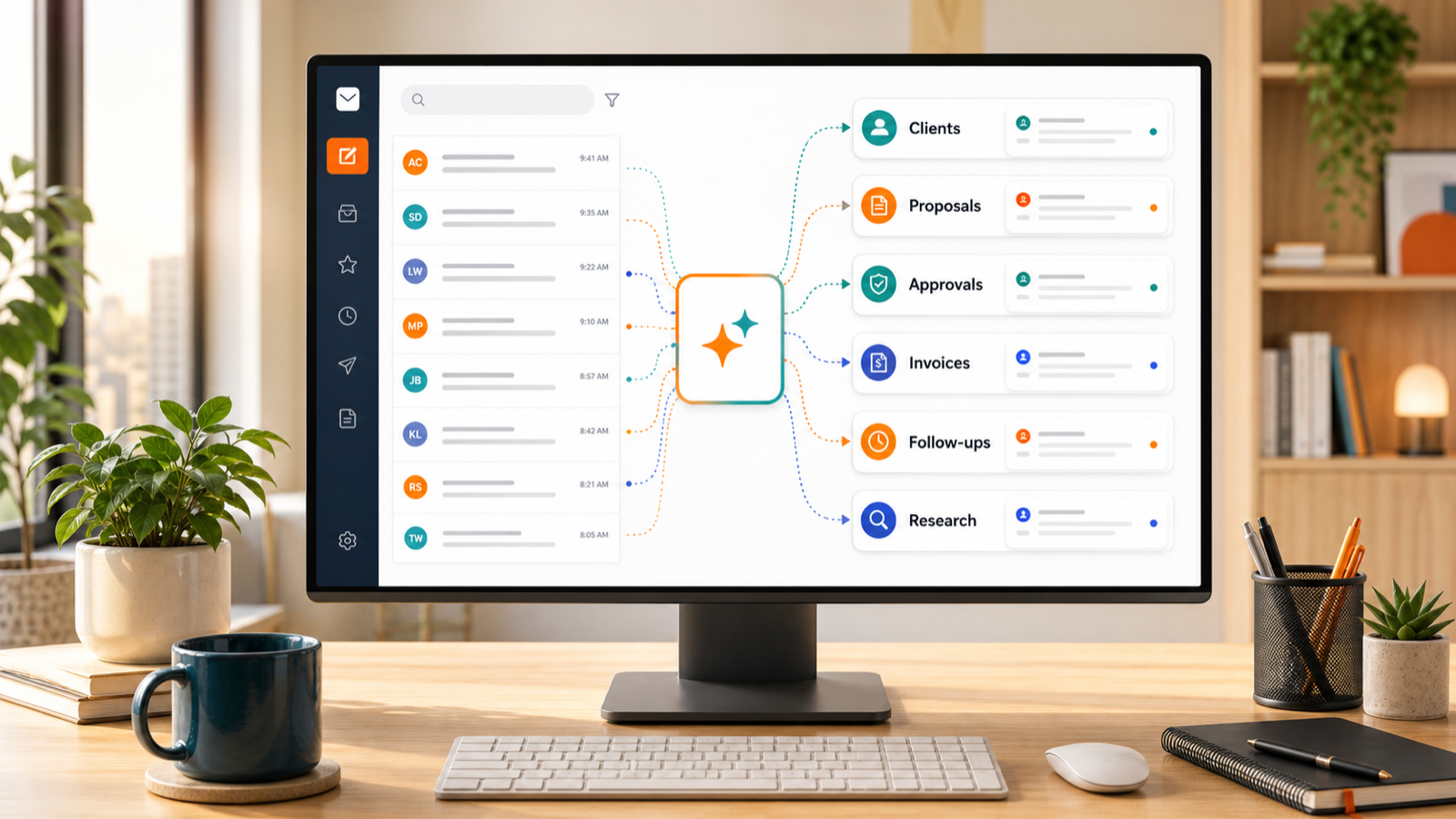
A practical guide to choosing an AI email assistant for consultants who need cleaner client triage, faster proposal replies, safer follow-ups, and calmer Gmail, Outlook, or Zoho workflows.
Consulting email is not just a place to read messages. It is where projects move forward, proposals get approved, invoices get clarified, client decisions arrive, and follow-ups quietly become revenue risk.
That is why the best AI email assistant for consultants should do more than write polished replies.
Writing help is useful, but consultants usually need a broader workflow: separate active clients from new leads, understand long threads quickly, keep proposal follow-ups visible, and reply without losing the nuance of the relationship.
If you work from Gmail, Outlook, Zoho Mail, or multiple inboxes, the right AI assistant should make your email easier to trust, not just faster to process.
This guide breaks down what consultants should look for in 2026, where generic AI email tools fall short, and how Replyless fits a calmer review-first workflow.
What consultants actually need from an AI email assistant
Most AI email assistants start with the same promise: write emails faster.
For consultants, that is only one part of the problem.
Your inbox may include:
- active client requests
- new inbound leads
- proposal questions
- scope changes
- invoice and payment threads
- meeting scheduling
- research links
- vendor messages
- newsletters and low-value updates
Those messages should not all compete in one feed.
A strong AI email assistant for consultants should help with five jobs:
- Sort client, proposal, finance, and follow-up email into useful views.
- Summarize long threads before you respond.
- Draft replies from real conversation context.
- Keep waiting threads from disappearing.
- Support multiple inboxes without mixing client context.
That is the difference between an AI writing button and a real consulting inbox workflow.
Start with client triage, not AI drafting
Consultants lose time when every email looks equally urgent.
A strategic client update sits next to a newsletter. A warm lead lands under a receipt. A payment question gets buried below calendar noise. A proposal thread waits three days because it looked like another routine message.
AI drafting cannot fix that on its own. You need triage first.
Replyless uses AI email categorization to classify messages by intent, urgency, sender, and workflow. For consultants, that can mean separating clients, proposals, invoices, follow-ups, scheduling, research, newsletters, and low-priority updates.
Then AI split inboxes turn those categories into focused lanes so you are not scanning one crowded inbox every morning.
The daily question becomes simpler: which client, lead, proposal, or payment thread needs attention today?
Why generic AI email tools can feel shallow for consultants
Many email apps now offer AI writing, summaries, or priority features. Superhuman focuses heavily on speed and premium email workflows. Spark leans into focus, smart inbox organization, reminders, and AI writing. Canary Mail emphasizes cross-platform email, AI writing, summaries, categorization, security, and calendar features. Newer AI assistant products like Jace push toward broader email workflows and automated actions.
Those patterns are useful, but consultants should be careful with tools that treat email as only a writing problem.
Consulting work depends on context:
- what the client already approved
- which deadline changed
- whether the message affects scope
- whether a follow-up should be soft, direct, or contractual
- which account or client workspace the thread belongs to
A generic draft can sound smooth while still missing the business situation.
The better pattern is review-first AI: let the assistant sort, summarize, and draft, but keep final judgment with the consultant.
Use AI drafts for first passes, not final sends
AI drafting is helpful when it removes blank-page time.
Consultants often send repeatable messages:
- "Thanks for the context, here is the next step."
- "I can take this on; here is my availability."
- "Quick follow-up on the proposal."
- "Here is what changed in scope."
- "Can you confirm who owns this approval?"
- "I have attached the invoice and project summary."
These are perfect candidates for AI-assisted first drafts.
Replyless AI email drafts use thread context and keep the final edit in your hands. That matters because consultants cannot afford replies that over-promise, sound too generic, or miss a sensitive client detail.
Use AI to get 70 percent of the way there. Own the last 30 percent.
Thread summaries protect billable attention
Long consulting threads are expensive because you have to reload the story before replying.
What was approved? What changed after the last call? Did the client already send the data? Was the deadline confirmed or only suggested? Did you promise a revised scope or just say you would review it?
An AI assistant should reduce that rereading.
Replyless thread summaries help you quickly understand what happened, what is unresolved, and what the next action should be.
For consultants, useful summaries should answer:
- What does the client need now?
- Is this about delivery, scope, payment, or scheduling?
- What decision is pending?
- What did you already promise?
- Does this need a reply, reminder, draft, or done state?
That is where AI becomes more than writing help. It protects your attention before the reply even starts.
Follow-ups should live beside the work
Consultants rarely lose opportunities because they cannot write a follow-up.
They lose them because the follow-up disappears.
A proposal waits for approval. A client says to check back next week. A lead asks for a scope estimate and goes quiet. An invoice needs a gentle nudge. A partner asks for a later conversation.
Those threads should not stay in the active inbox forever, but they also cannot vanish into archive.
Replyless email reminders help you close finished or waiting threads and bring them back when they need action. The stronger workflow is pairing reminders with summaries and drafts so the thread returns with context and a likely next step.
For consultants, this is especially useful for:
- proposal follow-ups
- unpaid invoices
- delayed client approvals
- post-meeting next steps
- renewal conversations
- old leads worth reviving
The goal is not to chase every thread. It is to protect the ones that affect revenue, trust, or delivery.
Snippets keep standards consistent
AI does not replace reusable replies. It makes them easier to adapt.
Consultants often repeat the same core messages:
- discovery call next steps
- proposal delivery
- onboarding requirements
- scope boundaries
- invoice reminders
- meeting recaps
- document requests
- project closeout notes
If the answer should stay consistent, save it as a snippet. Then use AI to adapt it to the thread.
Replyless email snippets help with repeat replies that should not be rewritten from scratch every time. This keeps your standards clear while still letting the message feel specific to the client.
The simple rule: snippets protect your process; AI helps with the wording.
Multiple accounts matter more than most consultants expect
Many consultants work across more than one inbox.
You might have a personal Gmail account, a consulting domain, a client-provided Outlook account, a shared finance inbox, or a Zoho Mail setup for a smaller business.
An AI assistant should keep those contexts separate.
Replyless supports multiple email accounts across Gmail, Outlook, and Zoho Mail workflows while keeping each connected inbox scoped. That matters because a client reply in one account should not borrow context from another client, another business, or a personal thread.
For consulting work, account-aware email is not a nice-to-have. It is basic trust hygiene.
What to look for before choosing an AI email assistant
Use this checklist before choosing a tool.
1. Workflow-aware sorting
Look for AI that can separate messages by consulting workflow, not just unread status or sender.
Useful lanes include clients, leads, proposals, invoices, scheduling, research, and follow-ups.
2. Review-first drafting
Avoid tools that push you toward blind auto-send for high-context client conversations.
The safer pattern is draft, review, edit, send.
3. Thread summaries before replies
If the assistant can draft but cannot summarize what happened, you may still waste time rereading before every response.
Summaries should make the next action clearer.
4. Follow-up reminders
A consulting inbox needs a place for waiting threads.
Reminders should bring important conversations back without forcing every open loop to sit in the active inbox.
5. Multi-account support
If you use Gmail, Outlook, Zoho Mail, or several client-facing accounts, make sure the assistant keeps each inbox scoped.
This is especially important for consultants handling sensitive client work.
6. Reusable snippets
Consulting replies often have recurring structure.
Snippets help keep proposal, onboarding, invoice, and scope language consistent.
7. Cleaner workflows for low-value senders
Consultants still get newsletters, receipts, tool alerts, and promotional noise.
An AI email cleaner helps remove clutter without turning your client inbox into a deletion project.
A simple consultant inbox setup
If you are setting up Replyless as a consultant, start simple.
Create focused views for:
- Active clients
- New leads
- Proposals and approvals
- Invoices and finance
- Follow-ups
- Research and newsletters
Then pair each view with the right action:
- Active clients: summarize, draft, reply, or mark done.
- New leads: qualify, draft a first response, and set a reminder.
- Proposals: keep approvals visible until the next step is clear.
- Invoices: protect payment threads from general inbox noise.
- Follow-ups: bring waiting conversations back at the right time.
- Research: keep useful reading away from urgent client email.
This gives you a calmer operating system without building a heavy CRM or support desk.
Best AI email assistant for consultants: the practical answer
The best AI email assistant for consultants is not the one with the flashiest writing demo.
It is the one that helps you protect client communication from inbox chaos.
Look for AI that sorts work into useful lanes, summarizes long threads, drafts from context, keeps follow-ups visible, supports multiple accounts, and lets you review before sending.
That is the Replyless angle: a calmer AI-native inbox for consultants who need to move faster without making client communication feel careless.
If your inbox is where client work, proposals, finance, scheduling, and follow-ups all collide, start with the Replyless feature library, then look at split inboxes, categorization, summaries, drafts, reminders, snippets, cleaner workflows, and multiple account support.